

Description
Download Verto Phone – Chrome Apps, WebRTC, audio calls, video calls, phone book, screen sharing
Verto Phone is a desktop application designed for real-time communication using WebRTC technology. It enables users to make audio and video calls, participate in video conferences, share screens, and manage contacts through a built-in phone book. The software integrates with FreeSWITCH via mod_verto, making it suitable for organizations seeking a customizable, open-source telephony solution. It is ideal for remote teams, small businesses, and IT administrators managing internal communication systems. The application runs as a Chrome App, leveraging the browser’s WebRTC capabilities for seamless connectivity. Real-world usage includes virtual meetings, remote support sessions, and internal team communication. The developer did not provide additional system requirements. The software is free to use, with no licensing fees or subscription models. Platform compatibility information is limited to Windows and Mac, though exact versions are unspecified. The application is designed for users familiar with web-based communication tools and those working within FreeSWITCH environments.
Key Features & Capabilities
- WebRTC Audio and Video Calls – Enables high-quality real-time voice and video communication directly through the desktop interface. Users can initiate calls with individuals or groups, leveraging WebRTC’s low-latency capabilities for smooth performance.
- WebRTC Video Conferences – Supports multi-party video meetings, allowing teams to collaborate visually from different locations. This feature is useful for remote team stand-ups, client presentations, and virtual workshops.
- Screen Sharing – Allows users to share their screen during calls, enhancing collaboration during troubleshooting, training sessions, or project reviews. The functionality is integrated directly into the call interface.
- Phone Book Integration – Provides a built-in contact management system for storing and organizing frequently used numbers and names. This simplifies call initiation and improves workflow efficiency.
- FreeSWITCH mod_verto Integration – Designed to work with FreeSWITCH’s mod_verto module, enabling secure, scalable communication infrastructure for enterprise and custom telephony setups.
User Interface, Workflow & Performance
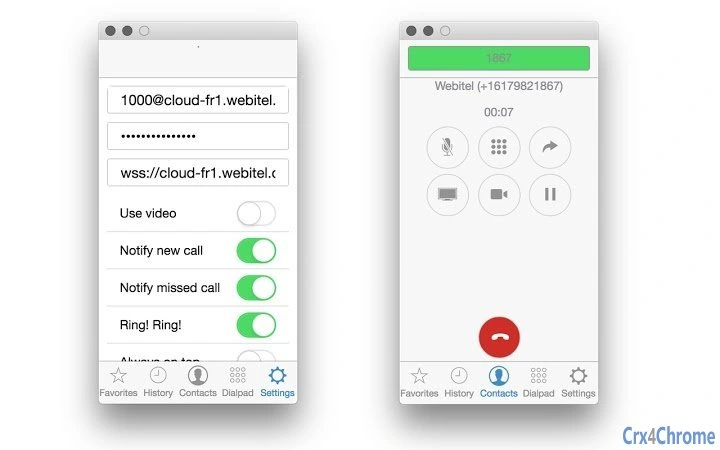
The user interface of Verto Phone is streamlined and focused on core communication functions. It features a clean layout with a central call control panel, contact list, and status indicators. Navigation is intuitive, allowing users to initiate calls, access the phone book, or start screen sharing with minimal clicks. The workflow is optimized for quick access to frequently used actions, reducing the time needed to begin a conversation. The application operates as a Chrome App, which means it runs independently of the browser but relies on Chrome’s underlying WebRTC stack. This integration ensures consistent performance across supported platforms. The developer did not specify resource usage details. Performance observations are based on general software behavior patterns. Stability is expected to be reliable given its reliance on Chrome’s mature runtime environment. However, actual CPU and RAM behavior may vary depending on system configuration and network conditions.Compatibility & System Requirements
Verto Phone is compatible with Windows and Mac operating systems. The application is designed to run as a Chrome App, which requires Google Chrome to be installed on the host machine. Exact system requirements were not listed. Compatibility information is limited to the operating systems mentioned. The installation size is not specified. Hardware requirements, including minimum CPU, RAM, or graphics capabilities, were not provided. The developer did not indicate whether the software supports older versions of Windows or Mac OS. Users should ensure that their system has a functioning microphone, camera, and stable internet connection for optimal performance. Platform compatibility information is limited.Pros and Cons
Pros
- Free to use with no subscription fees
- Supports high-quality WebRTC audio and video calls
- Enables real-time screen sharing for collaborative work
- Integrated phone book simplifies contact management
- Seamless integration with FreeSWITCH for scalable telephony
Cons
- No official support for Linux or other platforms
- Dependent on Google Chrome for operation
- Missing detailed system requirements
- Not suitable for users unfamiliar with WebRTC or FreeSWITCH
- Limited documentation and community support
FAQ Section
Is Verto Phone available for Linux?
Platform compatibility information is limited to Windows and Mac. The developer did not specify support for Linux.
Is Verto Phone secure?
The application uses WebRTC technology, which supports end-to-end encryption for calls. However, exact security protocols and implementation details were not provided.
Does Verto Phone require an internet connection?
Yes, Verto Phone relies on real-time communication protocols and requires a stable internet connection to function.
Can I use Verto Phone without FreeSWITCH?
Verto Phone is designed to work with FreeSWITCH via mod_verto. While it may function with other WebRTC-compatible servers, the developer did not confirm compatibility with alternative platforms.
How do I update Verto Phone?
As a Chrome App, updates are managed automatically through the Chrome Web Store. Users should ensure Chrome is up to date for the latest version.
Final Thoughts + CTA
Verto Phone offers a powerful, free solution for teams and administrators seeking a desktop-based communication tool built on WebRTC. Its integration with FreeSWITCH makes it a valuable asset for organizations already using or developing custom telephony systems. The combination of audio and video calling, screen sharing, and contact management provides a comprehensive communication experience. While it lacks support for Linux and relies on Chrome, its performance and ease of use make it a solid choice for Windows and Mac users. The absence of detailed system requirements and limited documentation may pose challenges for new users. Nevertheless, for those within the FreeSWITCH ecosystem, Verto Phone delivers strong functionality at no cost. Download Verto Phone now to enhance your team’s communication workflow with a secure, feature-rich desktop application.Guides & Tutorials for Verto Phone App for Chrome
How to install Verto Phone App for Chrome
- Click the Preview / Download button above.
- Once redirected, accept the terms and click Install.
- Wait for the Verto Phone App for Chrome download to finish on your device.
How to use Verto Phone App for Chrome
This software is primarily used for its core features described above. Open the app after installation to explore its capabilities.
User Reviews for Verto Phone App for Chrome 0
No reviews found





